Linus Ekberg - Game/Level Designer
Unity: Brew Besties (Steam Release)
-
Small Group
-
Role: Project lead, Programmer, designer
-
Additional work: Scrum master, UI (excluding menus)
-
~9 weeks to finish + a few extra for steam release
-
Unity, Maya, Blender, Photoshop, Trello, Github, Drive
-
Main Design goal:
-
Competitive cooperative chaos: While the game is cooperative where players need to work together. Provide an opportunity for a competitive and chaotic environment. Griefing each other is part of the fun!
-

Note: Released on Steam to get experience with Steamworks. There has been no marketing for this game.
How to play
Short series of videos explaining the basics of Brew Besties
Week 1-2 - Planning & First Playable
We spent the first days planning a co-op game. What really made the idea feel more fleshed out was scrapping class-based abilities and instead letting all players share the same abilities, which promoted our vision for silly chaos as sharing these abilities meant for less obvious role, and create more funny interactions.

It was crucial to get a first playable quickly as it would allow me to make design decisions and to know if the idea had potential. Therefore, I made a flowchart showcasing how the game loop would work. It allowed us to start programming and made sure I had thought of everything in the game's brewing process.
Whiteboard brainstorming

Initial Flowchart brewing system
When it came to our first playable playtest, I made sure we had the most crucial mechanics to our core idea. If we could get away with not implementing something without significantly sacrificing reliability of our test - we would. For example, the delivery request system was instead written on post-it notes. This meant that I would show the playtesters what kinda potion they should brew on physical notes. This also meant I could test the balance and design, by changing how frequently the recipes were more complicated and how often a new delivery request was given.
Another great benefit with using post-it notes, was testing whether or not to always show players the delivery request, or only when near the customers. During the playtests it was clear that showing players the delivery requests when near the customers, encouraged communication as the player who revealed the requests would shout out what the other player's needed to do. It also added an element of skill as some group of players could remember the recipes of the current request better than others, which meant they had to sacrifice less time walking to the customers to reveal the delivery requests again. This system was changed for the Steam release but was significantly designed based on the learnings of this test. (see)

I made some simple levels to test the mechanics and made whitebox models. Obviously very primitive, but it was to simply give me an idea of how the game plays out, what makes a level fun, the scale of levels etc.

Post-it notes used in the first playtests
First level in first-playable

Second level in first-playable
Week 2-3 - Prototyping new levels and mechanics
This week was all about prototyping, but also programming such as placing items on counters and some useful debug tools including a noclip camera, level selection, score manipulation etc.
One of the mechanics I prototyped this week - was the enchantment field, which makes ingredients enchanted when passed through. Enchanted ingredients are a different form of the ingredient that some costumers may request. The goal of this mechanic was to explore more dynamic levels, as all of the game's elements at this point was static. Additionally, I wanted a mechanic that could require the player to throw ingredients.
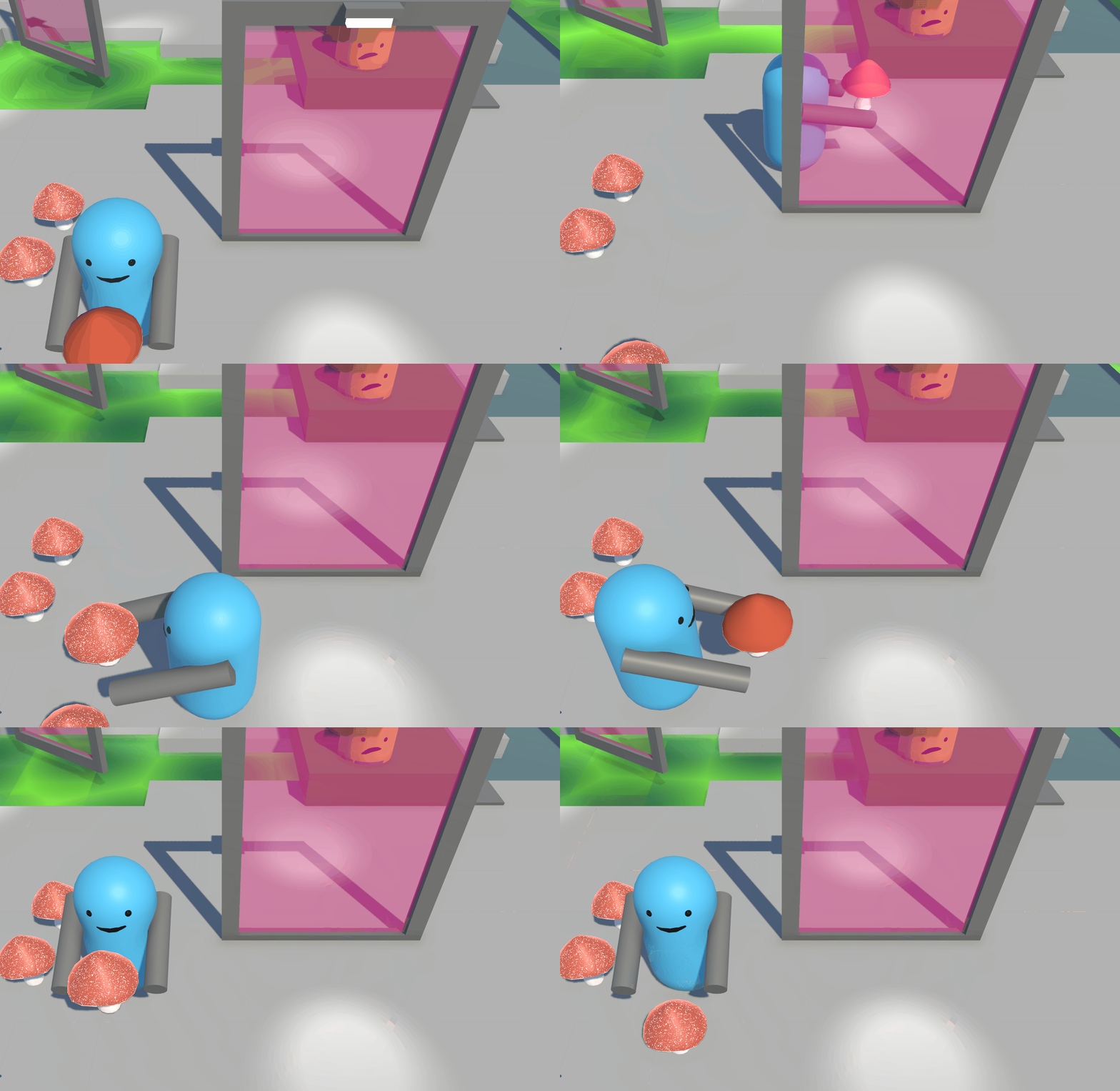
Player passes through the field holding an ingredient, which turns it to an enchanted form.
Another player is on a pressure plate which activates the enchantment field.
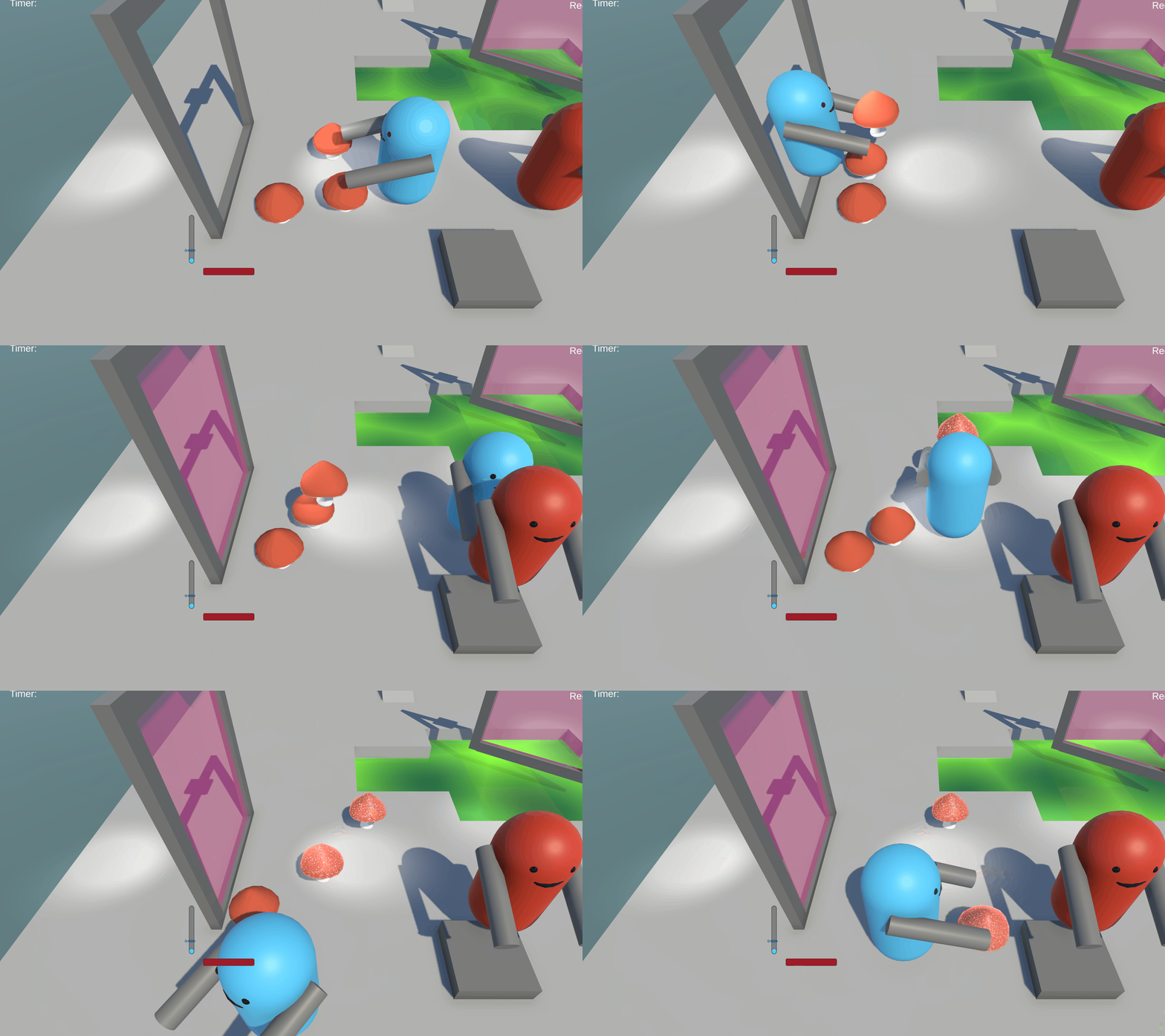
In the prototyped levels highlighted below, I tested different ways of combining the enchanted field together with item throwing. The first level has fields passing through the gap, as well as walls that blocks item. Furthermore, sometimes customers may not request enchanted ingredients, which would reverse the effect of the fields to be more of a hazard, meaning the player would actually want to avoid using them. This concept was reused for another level.
I wanted to find a greater way to promote using the attract and throw player mechanic. I found that the previous level I tried it with, lacked dynamic gameplay, as players would throw away their partner on an island and leave them there. On the second level I experimented with a rotating the enchanting field on cycles. This meant the players had to use their abilities to maneuver around the playarea to use the field effectively.
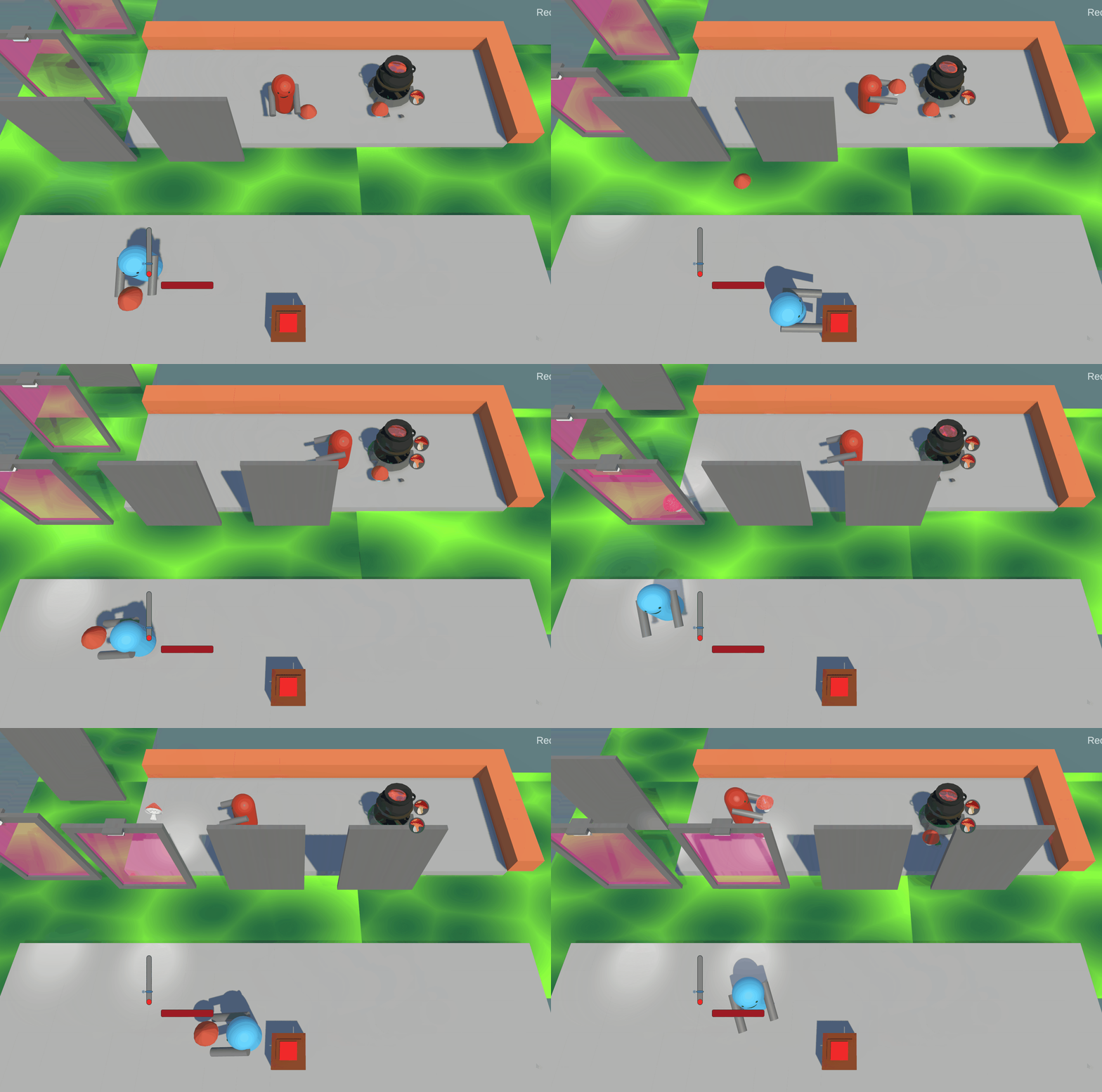
(A) Moving enchanting field level.
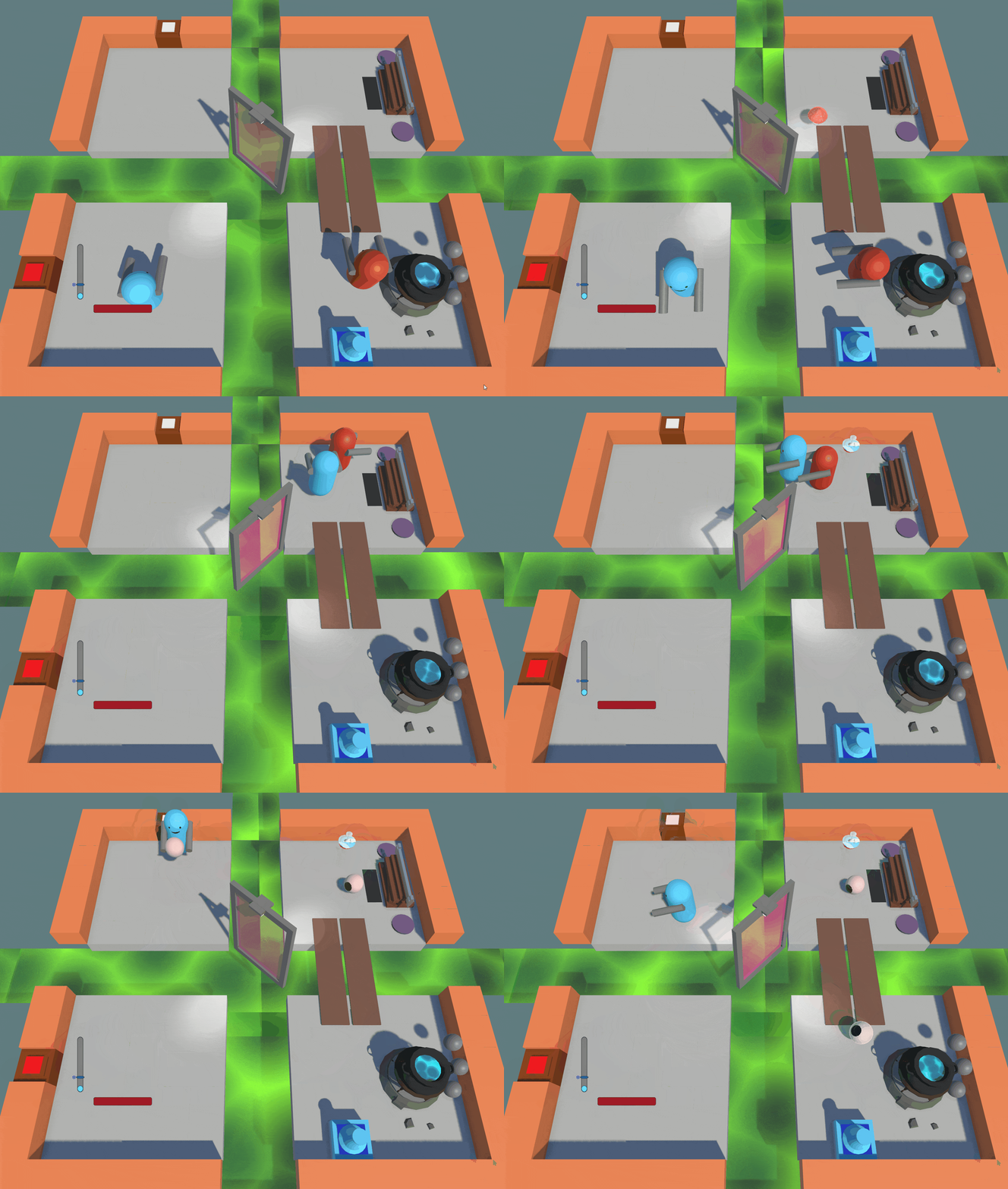
(B) Rotating enchanting field level.
I took the opportunity to sketch out several ideas for our backlog to use when the time is right for further development. One of these ideas that made it into the game, albeit in a quite different form, was the pumpkin. The final version omitted the requirement for two players to hold it, as I felt this detracted from the core mechanics of throwing and attracting, and due to limited development time.

Based on observations from the First Playable playtest, I changed the layout of levels. In the first level counters were made more useful. In this version, passing ingredients between players by using the counters was used way more in playtests. However, more changes were needed.


Level 1 - Before and after.
Finally, I worked on a Mission system which can be used for tutorials. I was never thrilled with the idea of having tutorials in the game, as I wanted to teach the mechanics organically, but I decided to make a simple one just to teach the mechanics to playtesters, and to learn more about tutorials from playtests.
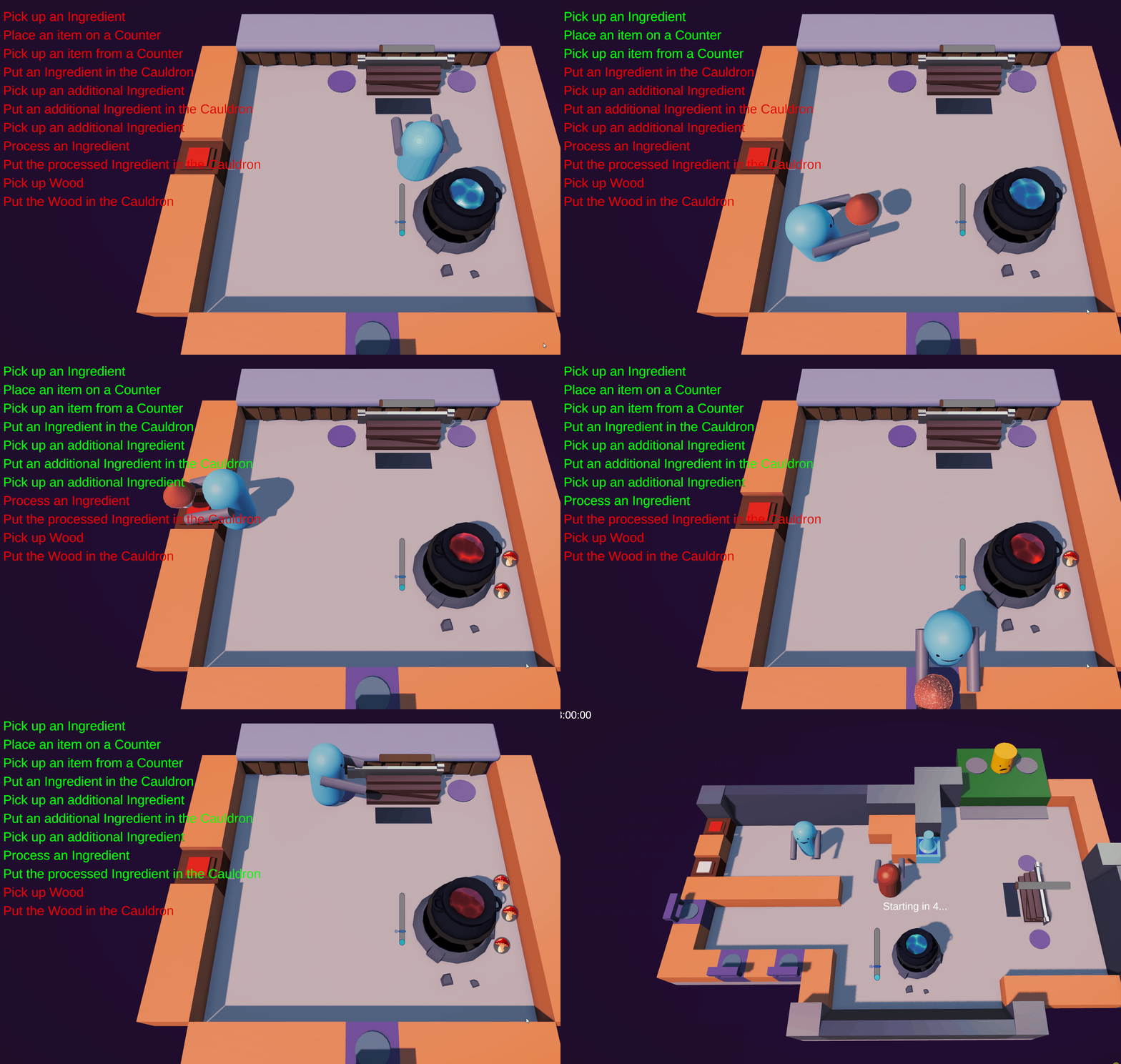
Test of tutorial .
Week 3-6 - Alpha & Design Decisions
Playtests from end of week 3
The game was at its best when players worked together. A common suggestion from playtesters and team members was to include more two-player stations, like the Saw Station. While I completely agreed on that cooperation made the game more enjoyable, I didn't agree that this was the right approach to foster it. My concern was that overly forcing two-player mechanics would actually make the game feel more rigid rather than collaborative and dynamic. For example, if every action required two players, the gameplay might devolve into predictable sequences: move together from A to B to C to D. To feel the essence of teamwork, there has to be some chaos, players must have different roles and tasks going on at the same time! I also felt that much of this feedback stemmed from certain levels lacking interesting design that encouraged players to discover new strategies or push for higher scores, which I would address later on.
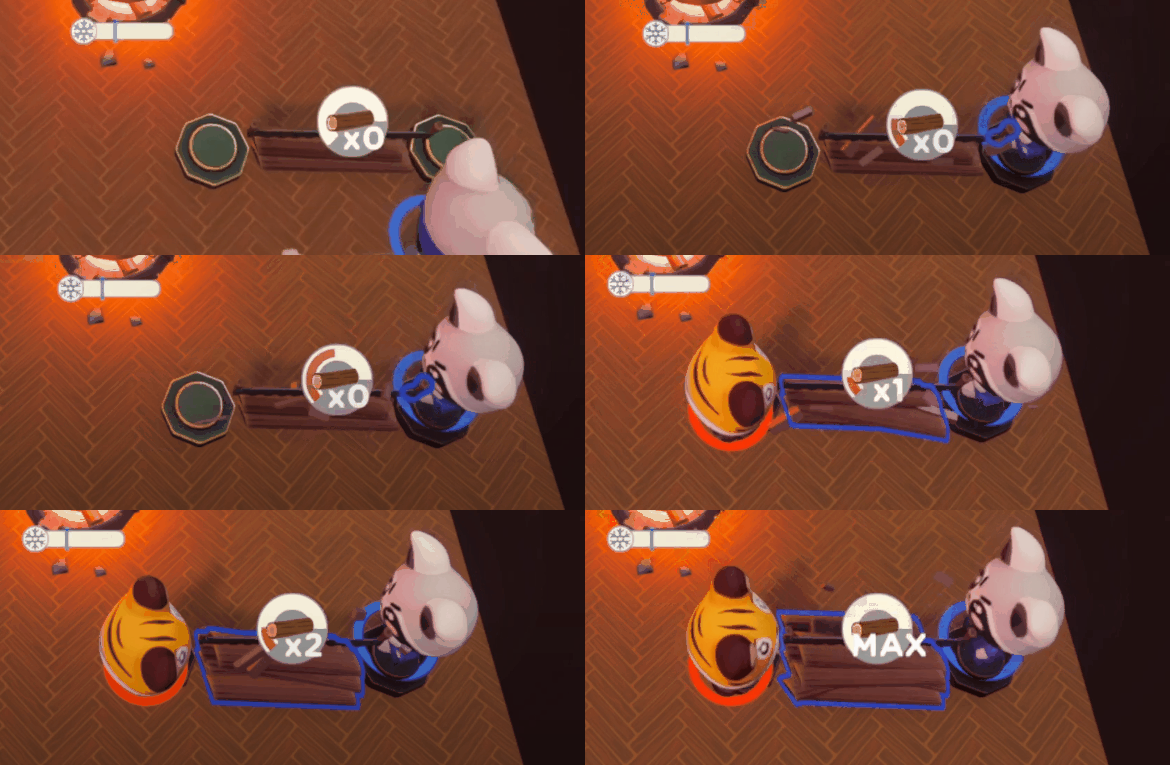
Sawing
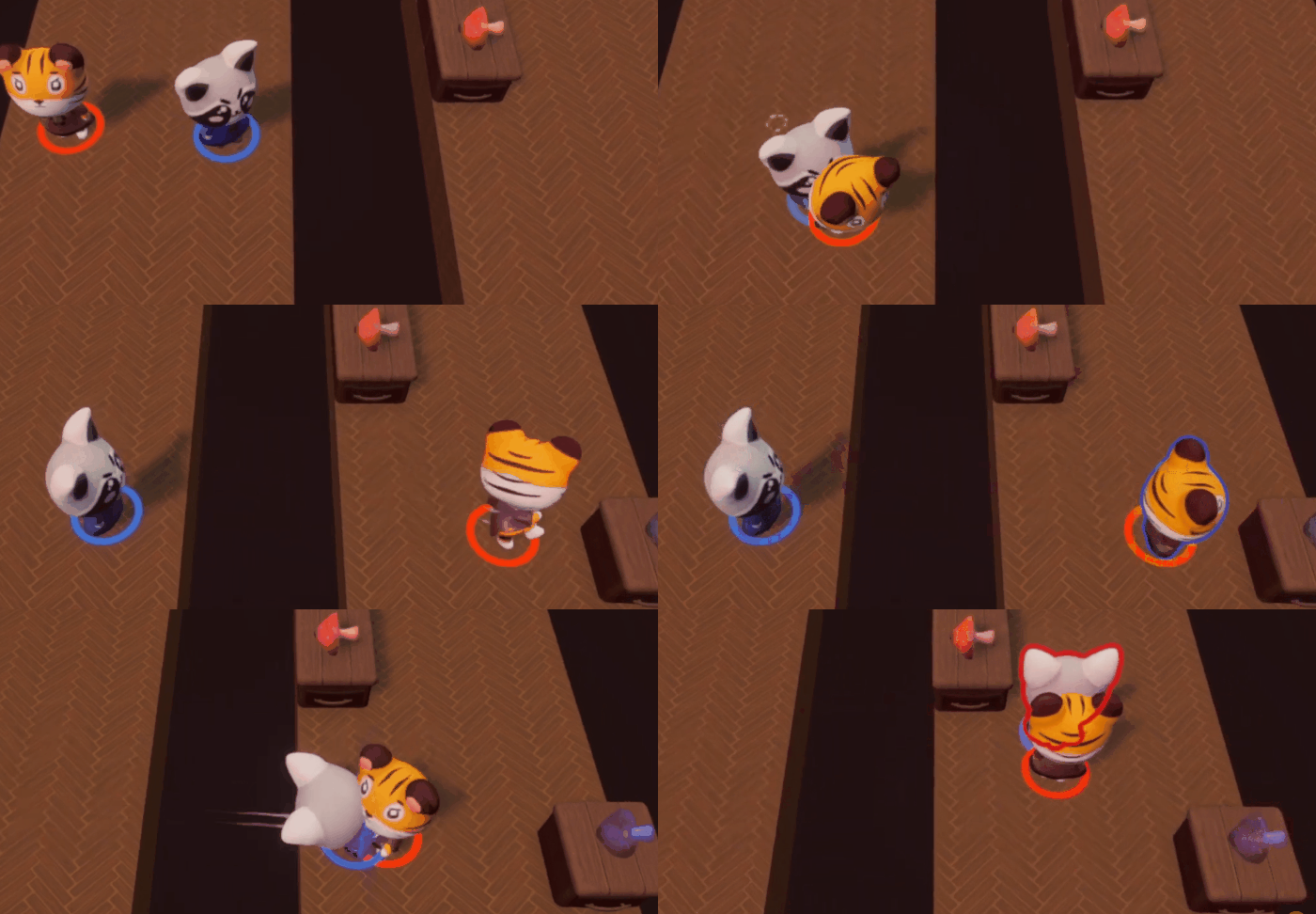
Throwing and Attracting players
That said, two-player mechanics are essential to achieving key moments of synergy, where players’ actions overlap in exciting and unpredictable ways. The goal was to strike a balance by incorporating collaborative mechanics while ensuring they didn’t dominate or disrupt player agency. For example, I created more dynamic levels where players could throw or attract each other across gaps, or utilize the saw station. While the Saw Station can be used solo, it works much faster when both players saw together, encouraging cooperation while ensuring the solo player remains engaged by actively making progress on the task as they wait for their partner to join.
In the comparison below, I updated the first level to include three cauldrons. This change significantly improved the pacing by encouraging multitasking and preventing the gameplay from feeling stale. With multiple cauldrons, players can brew more potions simultaneously, leading to frequent interruptions in their otherwise normal workflow, as they rush to deliver each finished potion as quickly as possible. Additionally, the updated counter layout promotes teamwork by making it much faster for players to pass items across the counters rather than walking all the way around them. Lastly, I removed the sawing firewood mechanic from the first level. Introducing too many mechanics early on felt overwhelming, and I wanted players to focus on mastering potion-making first. This ensures they gain confidence and are better prepared for the more complex challenges in later levels.

Before

After
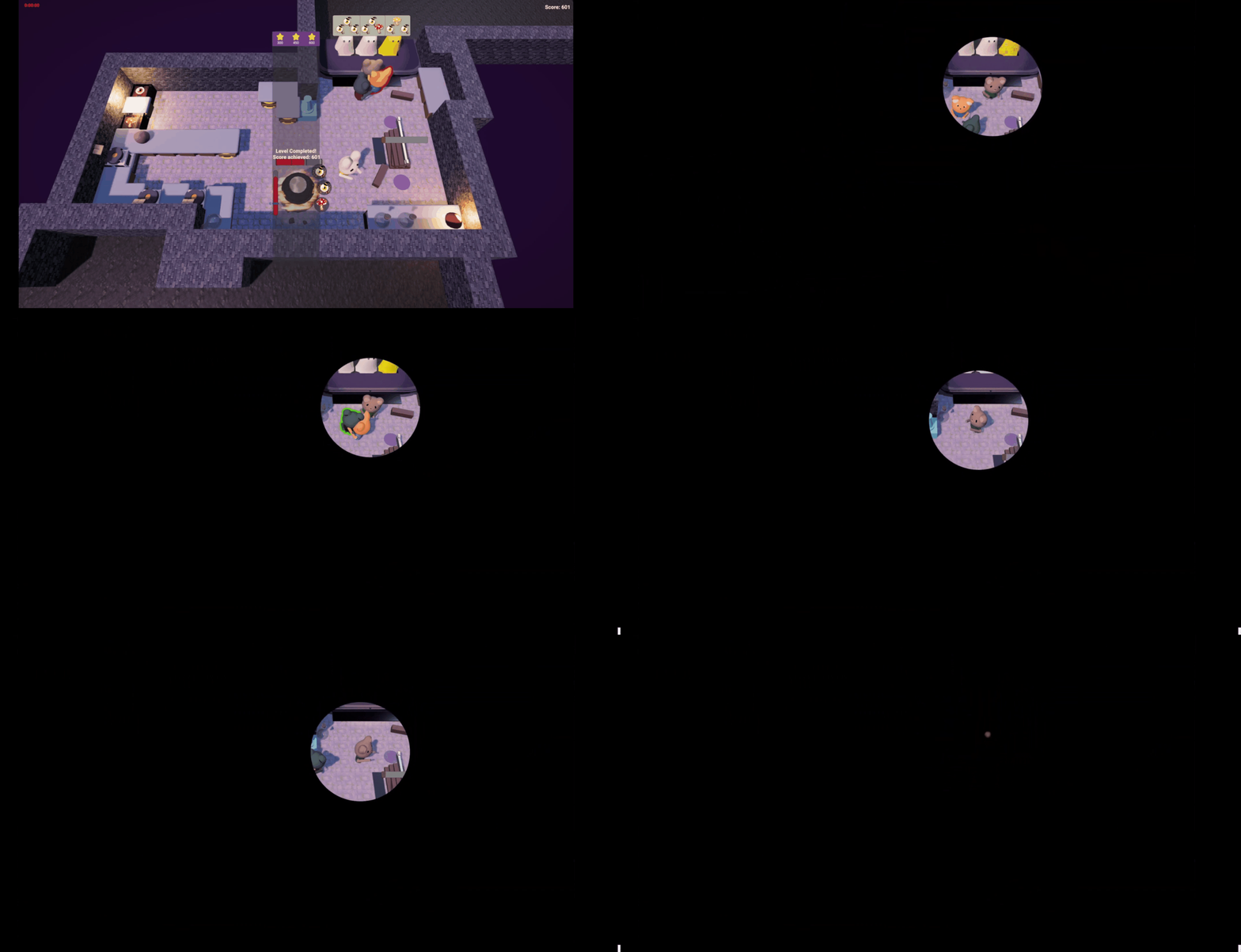
Early alpha "MVP" Transition screen
During this stage I implemented a level transition animation. It would pause towards the end, highlighting and following a random player. Players believed the game had selected the MVP of the round but in actuality it was simply random. This effect promoted the goal of creating a competitive cooperative chaotic environment, as players would fight over being in the circle and throw each other around. Many playtesters laughed and were loud during this transition which proved it was successful.
Week 6-9 - Beta & Code Release
During this stage, my number one priority was to make every mechanic feel smooth, that meant polishing everything to feel snappy and responsive, such as tweaking the attract mechanic. The levels also need to have a flow to them (Note: more about level design can be read here). One way I achieved this was really thinking about inputs. For example, I merged the attract and throw mechanic to be activated by the same button, as I figured you can't attract when you have something in hand, instead you can throw it.
As new levels were being developed, I wanted more twists in them to make them feel unique. Ice physics was a great way to make a level feel more unique but also added to some of the chaos that I strived for. Additionally, I made sure each level had ways of griefing other players by throwing them out and kill them as players really enjoyed doing so.
Later on, I felt the difficulty scale was too steep. I wanted to add a new second level that didn't require learning new mechanics. At this point of the game, players didn't need to know how to throw to progress, however, in this level, if throwing was used, players would save a significant amount of time. When players learned about the throwing mechanic, they could come back and get a better score. But, to make the level interesting and unique, I added the same icy physics, but only on the sides where the floor was wet and slippery. This, also meant players got used to ice physics before being thrown in to a level with all ice.
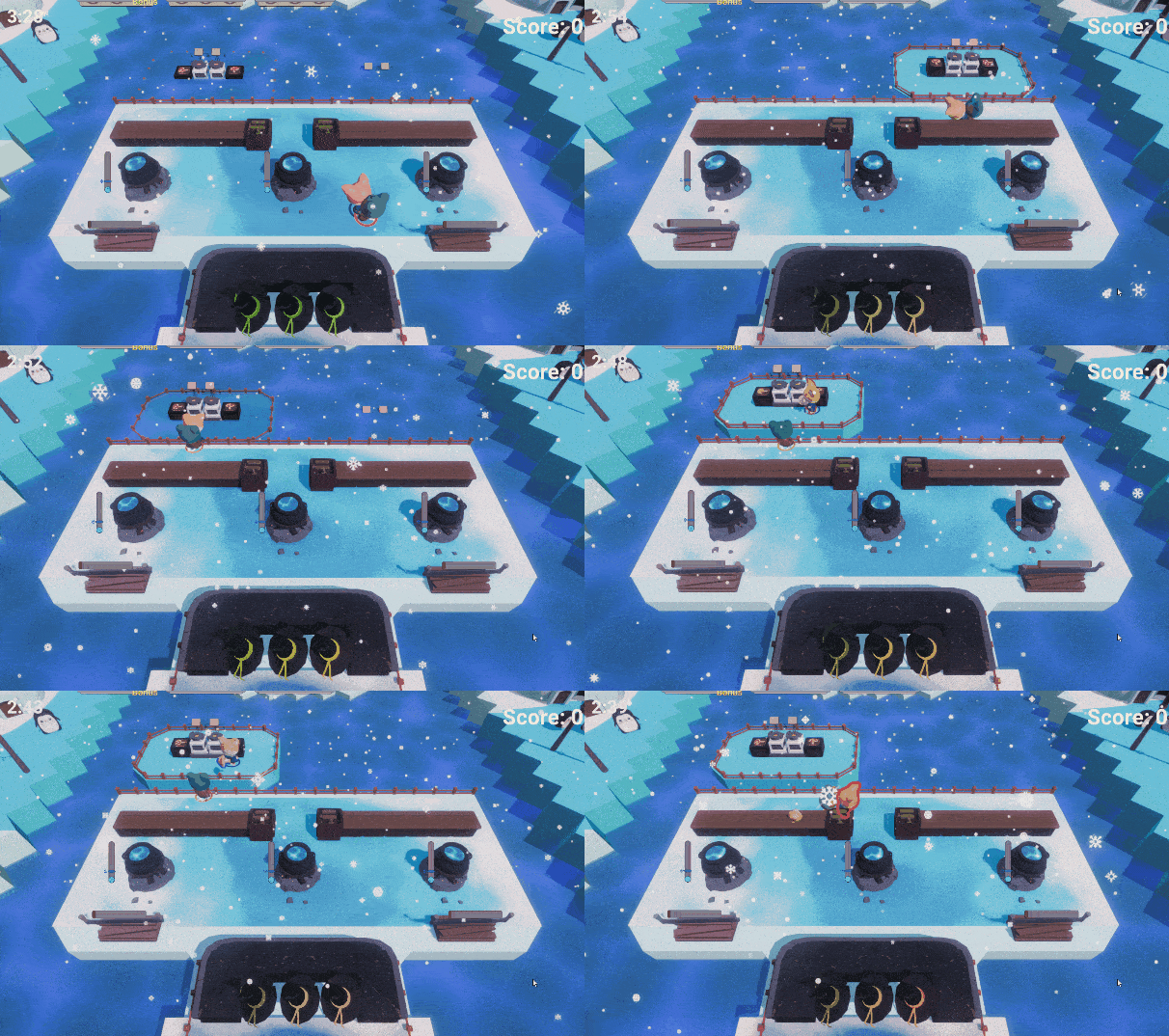
Early Beta Ice level


Early Beta - Level with slippery floor on sides
I made more levels and 2 tutorials for code release but you can read more about them here (levels | tutorials).
Late Beta- Level with slippery floor on sides. Players can throw items over the water instead of taking the longer slippery route. However, they still need to run back to deliver the potion.

Testing scene with player portraits.
I added player portraits to the UI using an overlay camera and some configured image renderers to only render one player on a portrait and only ingredients when held. Portraits allows players to see what they are holding and doing in general. Importantly, it also showed if they were dead and how many seconds until they respawn. This worked well with the next expression feature - emotes!
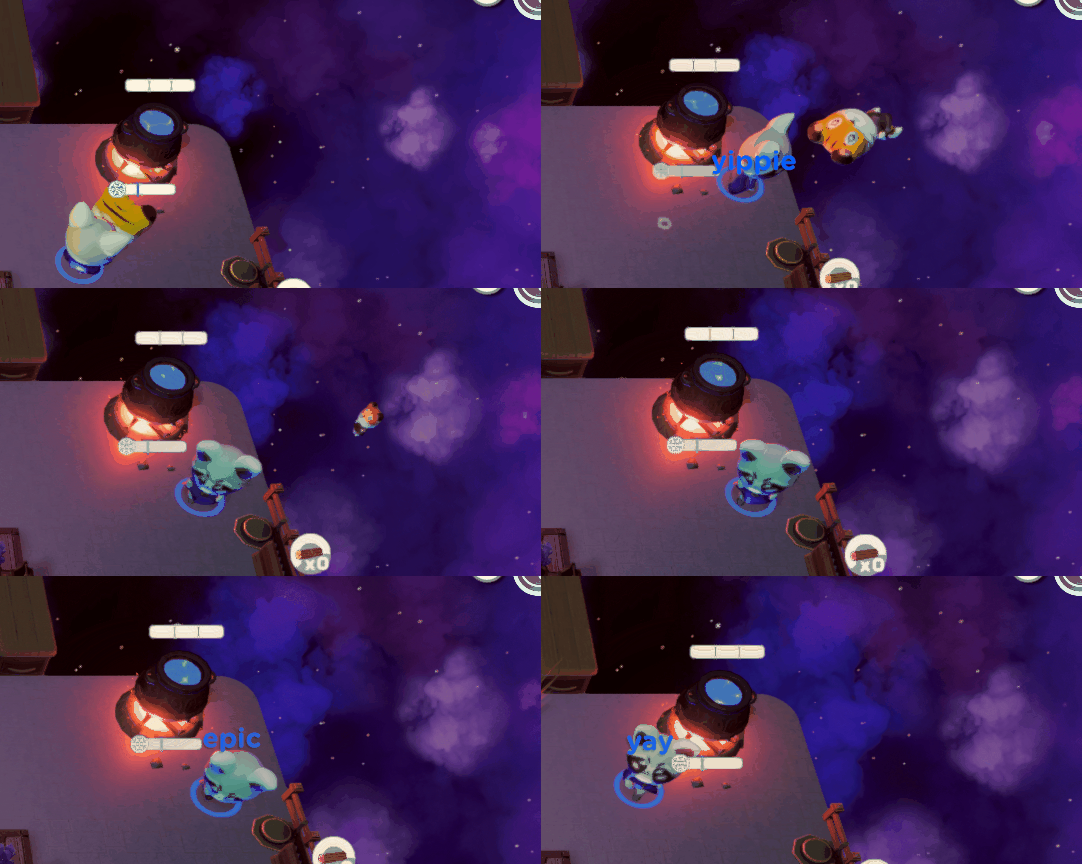
Emoting
Emotes also paired well with the previously mentioned MVP Transition screen. Additionally, if there was ever a stagnant moment for a player, they could fill that moment with emotes! When emoting, the player would also randomly "say" something, which just made for many funny moments!
Few days before Code Release (gameplay)
A little after code release I was prototyping wacky and fun mechanics. We weren't sure if we were going to update the game yet. I experimented with two teleport mechanics. Teleport-ports and teleport orbs. Teleport-ports allowed players to move teleporters and teleport using the altInteract-input. Teleport orbs worked like items. Players could to pass them around on counters and on other players. It would be assigned to the player that first picked it up from a box. As soon as it touched the floor the assigned player would teleport!
Teleport orbs demonstration video
Teleport-ports demonstration video
Steam Release - New levels, mechanics, programming, UI
For the Steam release I re-made most of the games scripts. I made an input and player assigning system. I added some new mechanics. Polished old mechanics. Remade, scrapped and added new levels. I also tried to make the UI in the game prettier (we had another person designated to do this but unfortunately they could never do it).
Revealing Recipes Overhaul
Up until this point, the potion recipes requested by customers were only visible when a player was near the delivery desk and would disappear once they stepped away. This system encouraged players to memorize recipes and communicate with their teammates about the required ingredients. While some found this mechanic fun and engaging, others found it too challenging. Therefore a compromise that maintained the appreciated aspects while improving accessibility was needed.
In the pdf below, I presented this idea to the team.
Reworking Throw & Attract (Powers)
A design challenge I tackled for this project was the precision of the "powers" system, which included throwing and attracting mechanics. Earlier I prioritized fast, snappy gameplay too much, where players would aim powers by running toward a direction without stopping. However, this approach lacked precision which caused both laughs and frustration. The frustration arose when players tried to throw other players or items over gaps. To address this, I initially placed fences to prevent players from running off cliffs, while still allowing items and players to be thrown through them. This alleviated some of the pain points, but there was still a lack of precision, and the system wasn’t perfect. I considered simply preventing players from running off cliffs altogether, but this felt like it would remove the chaotic fun that the game thrived on.
I implemented a system where, as long as the player held down the powers button, their movement would stop, allowing them to aim. It was only when the player released the button that the power would activate. This approach worked much better. I kept the fences in place as they were useful indicators of where throwing or attracting could be useful. Additionally, I reduced the length of the gaps. Previously, the gaps were roughly the same length as the throw range, which made them feel less intuitive and pushed players to get too close to the edge. The added precision also allowed me to introduce a new ingredient with a unique mechanic: crystals. Crystals break if not caught when thrown, so players need to be ready to catch them!
Tutorial
The previous version had its perks but lacked reliability. One major issue was that players enjoyed derping around more than learning the mechanics. They had fun throwing each other and experimenting, but this didn't help them progress. In an attempt to fix this, I made the second tutorial more engaging with unique challenges. However, it had too many mechanics packed into it, and we didn’t have enough development time for separate tutorials that could focus on fewer mechanics. Additionally, there weren't enough levels to introduce the mechanics in a fun, gradual way.
Late Beta Tutorial 1
Late Beta Tutorial 2
For the Steam release, I added more levels and scrapped some old ones. I realized even more so, I needed to introduce mechanics in unique, dynamic ways within the levels before moving on to new ones. From the start, I wasn’t a fan of traditional tutorials and preferred a slower, organic introduction to the mechanics. As mentioned before, I removed the sawing mechanic in earlier levels and gave the cauldron infinite fuel to ease players into the game.
I removed the tutorial levels entirely and replaced them with tutorial screens before each level. Playtesters found this approach much easier to grasp. Simple bullet points with graphics were far less overwhelming than playing through a tutorial without actually having seen how the mechanics worked. The biggest improvement was the increased number of levels, which now introduced mechanics at a more manageable pace. The new first level was pretty much the first tutorial level in a disguise, but with the addition of a tutorial screen before the level, players had a better understanding of how to play and still earned a score. Players where more willing to learn when they actually felt like they played part of the game and not a tutorial.
Finally, I added hints/prompts depending on conditions. For example, if the player needs an enchanted mushroom and they have a mushroom in hand, a prompt will show up at an enchanting station, showing how to enchant.
Tutorials in 1.0
Important to note: I still wanted some discoverability. Some mechanics are not explained, mainly ingredient zones, as players were quick to understand them and enjoyed figuring them out in playtests.
More About Level Design
In this level, the final version resembled the early prototype a lot. I tested adding wet/slippery floor in a few places but found that the original placement worked the best for the gameplay loop. With this placement, players found delivering items really exciting and nail-biting, especially, when manoeuvring when low on time. The final version also only had one ingredient type (eyeballs) instead of both mushrooms and eyeballs, which made making the right potion easier, which worked better for an early level, and honed in the gameplay on the slipperiness which was the most fun aspect of this level.

Cleaning Hour - First version

Cleaning Hour - Final version
Next up, is a level which had many changes. It started as a level with alternating platforms, that players had to work together to get to and get from. This aspect stayed throughout the revisions. There was a few problem with the first versions, the layout was too cramped, and it didn't feel fun or unique enough compared to other levels.

Snow Way Out - Version A

Snow Way Out - Version B
To add some uniqueness, icy physics was applied to the floor. Additionally, adding log sawing, meant players could overlap their actions more, previously players would have to wait for the player on the platform to give them ingredients too much. In version D, the enchanting counters were moved to the alternating platform, creating a better balance between players. The player on the moving platform now had more to do, while those on the main platform had more time for other tasks. Previously, the main platform players felt rushed, but this change allowed both roles to operate more smoothly and independently. Counters were placed to allow ingredients to be thrown from the alternating platforms more easily which made the gameplay more satisfying and less frustrating.

Snow Way Out - Version C
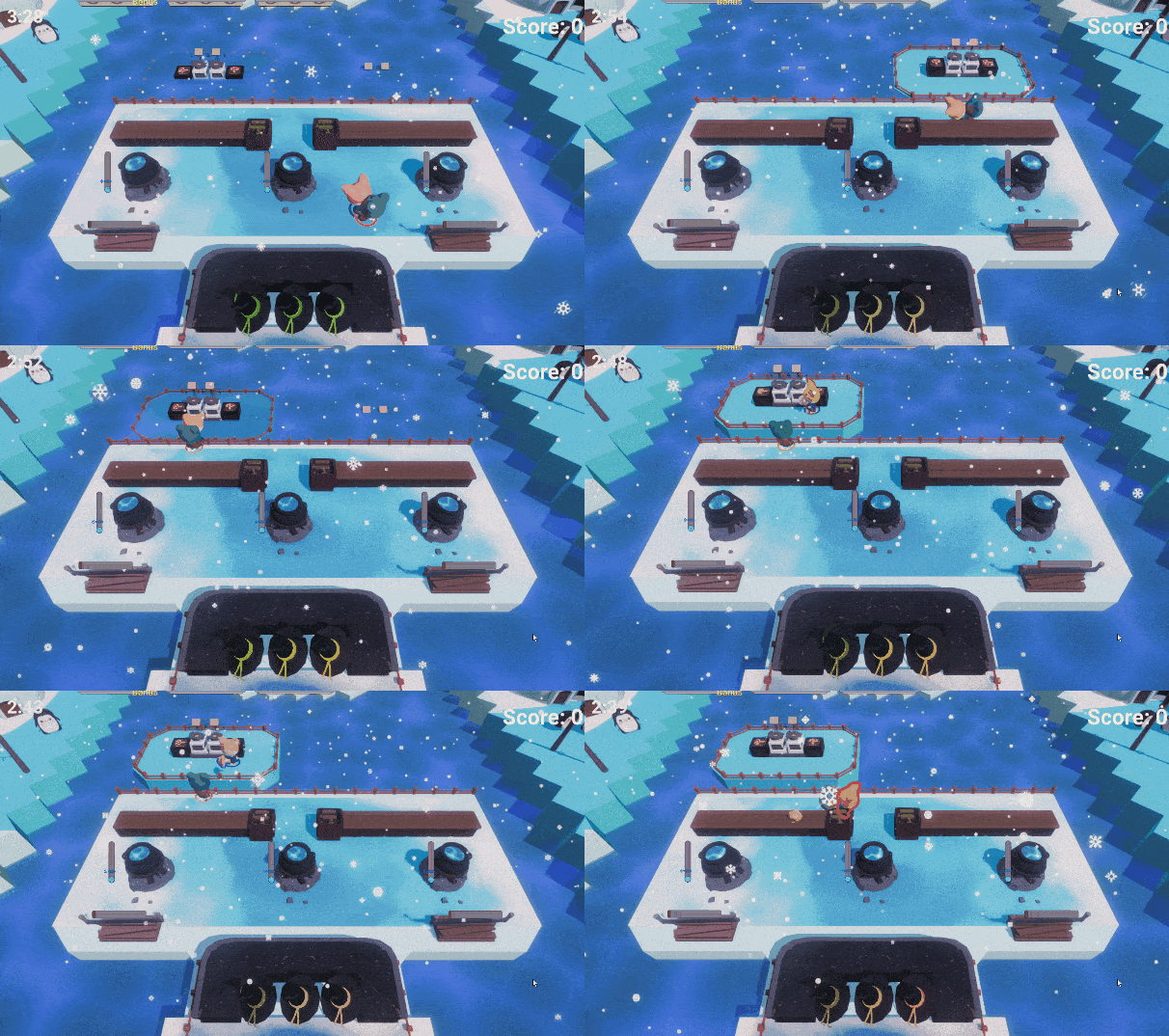
Snow Way Out - Version D
In the final version, the layout was redesigned to be asymmetrical. Planks were also added under certain spots, which negated the slippery physics. This contributed to an overall more smooth experience as well as feeling more varied.

Snow Way Out - Version E

Snow Way Out - Version F
There were a few scrapped levels, along with others that never made it past the prototype phase. One such level, Ghost House, was initially scrapped but later reimagined and incorporated into a new level with some of its original principles intact. The main goal of this level was to teach players how to attract and throw items. In the first version, this mechanic wasn’t required but was encouraged, as players would notice they weren’t scoring high enough to achieve three stars without using it. While the level worked, I felt it could be improved. In the remade version, counters floated along a stream between the playable areas. This design forced players to throw items onto the counters and use the attract mechanic to pass them along to each other. I also decided to remove the sawing mechanic from this level, to focus on the dynamic, floating counters. This approach felt far more collaborative, engaging, and added just the right amount of chaos to make it fun.

The Canal - Counters float along the water stream

Ghost House - First version

Ghost House - Late version
The Three Islands cave level was excluded from the Steam release. The glowing doors on the left acted as enchanting zones, forcing ingredients to become enchanted when passing through them. This was intended to teach players how to obtain enchanted ingredients, but the mechanic felt too forced, reduced visibility, and lacked clarity. I found better, more organic ways to introduce this concept. Additionally, the level tried to introduce too many mechanics at once, such as throwing players and sawing wood, which made it feel overwhelming. It also suffered from being too static, especially in four-player games, where each player would settle on their "own" island and rarely need to move after the first few seconds.
To address these issues, I designed new levels, one of which required players to be thrown onto pumpkin islands. As a pumpkin was picked up, a new one would spawn on a different island, making the gameplay far more dynamic and engaging. Mushrooms would also spawn and float along the rivers, creating opportunities for players to grab them as they passed. This added variety to the flow of the level and encouraged players to move strategically and collaborate, resulting in a more exciting and active experience.

Three Islands level

Pumped Up level
Programming
List of some scripts I programmed. Not including scripts I collaborated on. Removed audio and VFX in scripts. Click [ ▶] to watch related videos.
[ ▶] Delivery system
-
RecipeCandle: Handles AltInteractions on the recipe candle.
-
RecipeCandleManager: Manages recipes candles and when to show recipes.
-
RecipeCandleManagerUI: Updates UI based on RecipeCandleManager state.
-
DeliveryCounter: Subclass of BaseCounter. Counter that send potion information to DeliveryManager.
-
DeliveryManager: Creates new orders, manages potions sent from DeliveryCounter and whether or not the sent potion is a correct order.
-
DeliveryManagerUI: Creates new orders and updates the queue of orders in the UI.
-
DeliverySingleOrder: Handles a single order (failure, success, time run out, score)
-
DeliverySingleOrderUI: Displays what ingredients are neededand time left in the order. Plays completion and failure animations.
-
Ghost (Customer): Handles an individual ghost, such as animation and appearance.
-
GhostManager (CustomerManager): Manages all ghosts based on states.
Items can be held by players and counters. BaseCounter and PlayerInteract implement IItemParent.
-
-
MainCounter: Normal counter that can have items placed on it.
-
ItemOnMainCounter: Starts the counter with an item on it.
-
-
DeliveryCounter: Counter that send potion information to DeliveryManager.
-
MagicCounter: Counter that can also have ingredients enchanted by players AltInteracting.
-
ResourceCounter: Counter that spawns an ingredient in the player's hand when interacted with.
-
[ ▶] SawCounter: Player's can saw to get firewood.
-
TrashCounter: Counter that deletes items.
-
Miscellaneous scripts:
-
AudioEnvironment: Plays environmental audio clips in random intervals.
-
CameraDynamicPlayer: Reads the average position of all players and moves appropriately.
-
[ ▶] CameraSway: Moves camera in a pattern to prevent a static camera.
-
CauldronState: Controls the Cauldron interactions, information and displays ingredients in cauldron as in world UI.
-
CollisionCustom: Trigger collision that nudges objects instead of direct collisions.
-
ColliderVisualizer: Set visualisation setting of collider in editor.
-
DebugFrameRateTester: Used to test game on different framerate settings.
-
DisableOnStates : Disables gameobject based on GameState.
-
FireState: Controls fire value and its UI in Cauldron.
-
FloatObjects: Moves gameobject in a floating manner.
-
FloorFragile: Used for floors that can be destroyed when walked on.
-
ForceLook: Forces player to look a specified direction.
-
GameManager: Controls the game and its states.
-
[ ▶] GameStartCountdownUI: Control game start animation.
-
GameTimerAudio: Play audio for GameTimerUI.
-
GameTimerUI: Reads gametimer and displays on UI with warning effects.
-
GlyphHandler: Changes glyph (input sprite prompt) based on what user specified in the settings.
-
IAltInteractable: Interface for classes where players should be able to Alt-interact.
-
IBarUI: Interface for UI with Bar.
-
IHasProgress: Interface for classes that have progress such as MagicCounter where players AltInteract to enchant ingredients.
-
Killbox: Handles when players and items enters it triggers. E.g. calls PlayerDeathManager.Die();
-
Lever: Implements Alt-interact. Switches states on game elements when players pull it.
-
LevelInitializer: Initializes the level, useful when debugging as you can set different settings such as amount of players.
-
LoadMeOnGameStart: Loads gameobject on game start
-
LookAtCamera: (Billboard) Rotates object to face the camera.
-
MaterialColorChanger: Changes the material color, used in cauldron and potion liquid.
-
OverlayCameraCopyMainCamera: Ensures the in-space UI Overlay camera follows the main camera.
-
PlatformController: Controls platforms that move.
-
PlatformControllerManager: Manages all PlatformControllers to move on different cycles
-
PressurePlate: Switches game elements when players stand on it.
-
ProgressBarUI: Displays UI based on progress of certain actions such as sawing.
-
PumpkinStation: Controls an individual Pumpkin to grow.
-
PumpkinStationManager: Manages which and when a PumpkinStation can grow a pumpkin.
-
ReplacePlayerValues: Replaces player values in certain conditions such as on slippery floor.
-
RespawnCheckpoint: Updates player respawn position.
-
ScoreManager: Handles score updates.
-
ScoreManagerUI: Updates score on UI and plays score animations.
-
TextTypewriter: Plays animation that reveals letters like a typewriter.
-
TravelBetweenPoints: Set gameobject to travel between points.
-
TutorialPromptController: Hides and shows prompts/hints depending on player actions.
-
TutorialUI: Animates and sets states of individual tutorial screens
-
TutorialUIManager: Manages the tutorial screen and handles input.
-
UIShowOnGameplay: Fades in UI elements on gameplay gamemanager states
-
UITransparencyController: Adjusts UI's transparency based on closest player's distance to the UI element.
Player scripts:
-
PlayerCameraRendererUI
-
PlayerDeathManager
-
PlayerDeathVFX
-
PlayerEmote
-
PlayerInteract (Item)
-
PlayerRendererUI
-
PlayerRespawnUI
-
PlayerAudio
-
PlayerInitializer
-
PlayerMovement
-
PlayerVibrationController
Scripts for player selection in the lobby and saving config:
-
PlayerCharacterSetupController
-
PlayerConfigManager
-
PlayerConfig
-
PlayerAllReadyManager
-
PlayerSelectionPositionManager
-
PlayerSpawnUIMenu
Item & Ingredient scripts:
-
Item
-
Potion: Can be filled from cauldrons and can empty a cauldron.
-
Firewood: Can be used as fuel for cauldrons.
-
Ingredient: Can be used in cauldrons and can be enchanted.
-
Crystal: Also destroys itself when hitting the ground.
-
Pumpkin: Contains pumpkin specific properties.
-
-
-
ItemSO: ScriptableObject that contains item information such as sprites and what type it is (mushroom, eyeball etc)
-
IItemParent: If attached to gameobject, it can be used as a parent for an item. For example counters can have items on it and players can hold items.
-
ItemPlayerRenderer: Rendering properties for items on player portraits.
-
ItemFloatTrigger: Items will float like on water if triggered.